





Memory seats are one of the most convenient and comfortable features in modern Chevrolet and GMC vehicles. These systems allow you to save your preferred seating position, so you never have to manually adjust your seat every time you drive. Whether you’re behind the wheel of a Chevrolet Silverado or a GMC Sierra, setting memory seats ensures that your driving position is always just how you like it, whether you’re driving solo or sharing the vehicle with others.
In this guide, we’ll walk you through the process of how to set memory seats using both the door buttons and the vehicle’s display screen. By following these easy steps, you’ll enjoy an optimal driving experience every time.
What Are Memory Seats and How Do They Work?
Memory seats allow you to save and recall specific seat positions with the push of a button. This is especially useful in households with multiple drivers. The system allows the driver to adjust the seat’s position, height, tilt, and sometimes the steering wheel and mirrors, so that each driver can have their optimal comfort settings. Once saved, these settings can be recalled quickly for a personalized driving experience.
Memory seats are controlled through two main systems: physical buttons located on the door and a digital interface accessible through the vehicle’s display screen.
How to Set Memory Seats Using the Door Buttons
In your Chevrolet or GMC vehicle, the memory seat buttons are located on the driver’s side door panel. These include the Set, 1, 2, and Easy Exit buttons. Here’s how to use them to save and recall your preferred seat positions:
Step 1: Adjust the Seat to Your Desired Position
Before setting your memory seat, adjust the seat to your ideal position. This includes adjusting the seat’s forward/backward position, height, and backrest recline. If your vehicle includes steering wheel adjustments, be sure to position the steering wheel to your liking as well.
Step 2: Locate the Memory Buttons
On the driver’s side door, you’ll find the Set, 1, 2, and Easy Exit buttons. These are essential for saving and recalling seating positions:
- Set: Used to store the seat position.
- 1: Preset for the first driver’s seat position.
- 2: Preset for the second driver’s seat position.
- Easy Exit: This button adjusts the seat for easy exit when the vehicle is turned off.
Step 3: Save Your Seat Position
Once you’ve adjusted the seat to your preferred settings, press and hold the Set button, then press either 1 or 2 to assign the seat position to the corresponding memory profile. After pressing the button, you’ll hear two distinct beeps, indicating the memory has been saved. This confirms that the settings have been successfully stored.
Step 4: Recall the Memory Setting
To recall your saved seat position, simply press the 1 or 2 button on the door. The seat will automatically adjust to your saved settings. This allows you to switch between drivers without manually adjusting the seat each time.
Easy Exit Function
When you turn off your Chevrolet or GMC vehicle, the Easy Exit button automatically moves the seat back to a position that allows for an easier exit from the vehicle. This feature is incredibly helpful when you’re ready to get out of the vehicle, as it creates more space between the seat and the steering wheel.
Using the Display Screen to Turn On Memory Seat Features
Your Chevrolet or GMC vehicle also includes a display screen where you can manage memory seat settings. While the display screen does not allow you to adjust seat positions directly, it is used to activate the memory seat feature for entry and exit memory.
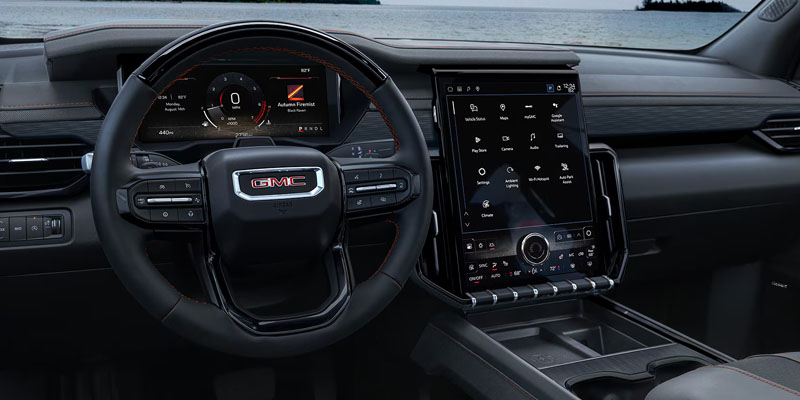
Step 1: Access the Settings Menu
From the home screen on your vehicle’s display, tap Settings. Then navigate to Vehicle and select Seating Position.
Step 2: Toggle Memory Settings
Within the Seating Position menu, you’ll find options to activate Driver Seat Entry Memory and Driver Seat Exit Memory. Toggle both settings to “On” to ensure the memory seat function works for both entry and exit.
- Driver Seat Entry Memory: This feature adjusts the seat to your saved position when you start the vehicle, ensuring your seat is always in the right spot as soon as you get in.
- Driver Seat Exit Memory: This feature moves the seat back to a position that allows for easier entry and exit when you turn off the vehicle.
Once these settings are activated, the memory seats will function automatically according to your preferences every time you drive.
Benefits of Memory Seats in Your Chevrolet or GMC
Memory seats offer several advantages for drivers who want to experience a high level of comfort and convenience in their vehicle. Here are some of the main benefits:
- Personalized Comfort: Memory seats ensure that each driver can enjoy their optimal seat position without needing to make manual adjustments each time they drive.
- Convenience for Multiple Drivers: In a household or workplace with more than one driver, memory seats eliminate the need for constant seat adjustments, allowing everyone to drive comfortably.
- Enhanced Accessibility: The Easy Exit feature makes getting out of the vehicle much easier, especially for those who find it difficult to get in and out of the vehicle due to seating position.
- Better Driving Posture: By ensuring the seat is always positioned correctly, memory seats help maintain better posture, reducing the risk of discomfort during long drives.
Chevrolet and GMC Models That Offer Memory Seat Features
Memory seats are available on many higher trim levels across the Chevrolet and GMC lineup. While availability depends on the vehicle, trim level, and equipment package, this feature is commonly found on models designed with enhanced driver comfort and convenience.
Some Chevrolet models that may offer memory seating include:
- Chevrolet Silverado 1500
- Chevrolet Tahoe
- Chevrolet Suburban
- Chevrolet Traverse
- Chevrolet Equinox
Some GMC models that may include memory seat technology include:
- GMC Sierra 1500
- GMC Yukon
- GMC Acadia
- GMC Canyon
Depending on the vehicle, memory settings may store more than just the driver’s seat position. Some models can also save adjustments for features like outside mirrors, steering column position, and other personalized comfort settings. Always check your owner’s manual or vehicle settings menu to confirm available features for your specific Chevrolet or GMC model.
Common Chevrolet and GMC Memory Seat Problems and Solutions
While memory seats are designed to make driving more convenient, occasional issues can occur. If your Chevrolet or GMC memory seat is not working correctly, try these troubleshooting steps.
Memory Seat Will Not Save a Position
If your seat position is not saving, make sure you are following the correct setup process:
- Place the vehicle in Park.
- Adjust the seat, mirrors, and steering wheel to your preferred position.
- Press and release the Set button.
- Immediately press and hold the desired memory button until you hear confirmation chimes.
If you do not hear the confirmation sounds, the position may not have been saved successfully. Repeat the process and make sure the button sequence is completed correctly.
Memory Seat Does Not Move to the Saved Position
If the seat does not return to the stored position:
- Make sure nothing is blocking the seat tracks.
- Hold the memory button until the seat finishes moving.
- Confirm you are using the correct driver profile or key fob.
- Check that Seat Entry Memory and Easy Exit settings are enabled.
Some Chevrolet and GMC vehicles can connect memory settings to individual key fobs, allowing different drivers to automatically access their preferred seating positions.
Memory Seat Buttons Are Not Responding
If the memory buttons do not activate the seat:
- Turn the vehicle off and restart it.
- Check your vehicle settings menu for memory seat activation.
- Replace the key fob battery if needed.
- Inspect for any electrical issues if the controls remain unresponsive.
If the problem continues, scheduling a service appointment with a Chevrolet or GMC service department can help identify and repair the issue.
Tips for Getting the Most From Your Memory Seats
A few simple habits can help you get the best experience from your Chevrolet or GMC memory seat system.
- Save a separate setting for each driver who regularly uses the vehicle.
- Adjust mirrors and steering wheel before saving your position.
- Use the Easy Exit setting to create more space when entering and leaving the vehicle.
- Review your settings after vehicle maintenance or battery replacement.
- Check your vehicle settings menu to customize memory seat preferences.
Taking a few minutes to properly configure your memory seats can make daily driving more comfortable and reduce the need for repeated manual adjustments.
Frequently Asked Questions About Chevrolet and GMC Memory Seats
Do all Chevrolet and GMC vehicles have memory seats?
No. Memory seats are available only on select Chevrolet and GMC vehicles and trim levels. Availability depends on the model year, trim package, and installed features.
How many driver positions can Chevrolet and GMC memory seats save?
Many Chevrolet and GMC vehicles allow two drivers to save personalized seating positions using Memory 1 and Memory 2 settings. Some vehicles can also connect saved preferences with individual key fobs.
Can memory seats save mirror and steering wheel settings?
Some Chevrolet and GMC vehicles can save additional driver preferences, including outside mirror and steering column positions. Available features vary depending on the vehicle model and equipment package.
Why does my memory seat stop moving during recall?
The system may stop if an adjustment button is pressed, the memory button is released, or an obstruction prevents the seat from moving. Remove any obstacles and try recalling the setting again.
Can I reset my Chevrolet or GMC memory seat settings?
Yes. You can overwrite saved positions by adjusting the seat to a new preferred position and saving it again using the Set and memory buttons.
At Primasing Motors, we are dedicated to providing you with the highest level of customer service and satisfaction. When you choose to shop with us, you’re not just purchasing a vehicle; you’re investing in a partnership built on trust and a commitment to excellence. Whether you’re looking for a new Chevrolet or GMC vehicle or need expert advice on utilizing features like memory seats, our team is here to help. We understand the importance of comfort, convenience, and personalized service, and we are proud to be your trusted resource for all your automotive needs in Lebanon, OR. Visit us today to experience the Primasing Motors difference and find the perfect vehicle for you.
Connect with us

